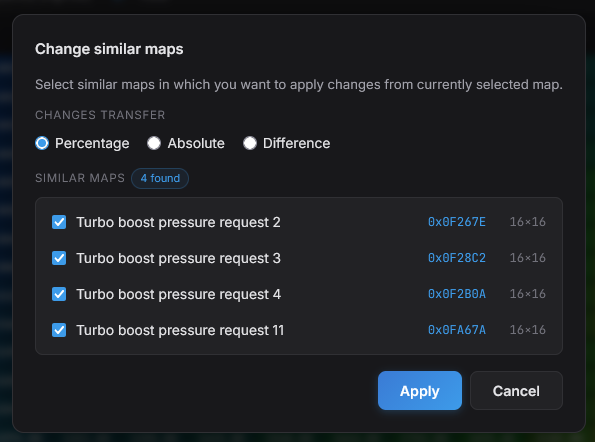
We're rolling out a new feature designed to save you serious time when working with multiple related maps: Change similar maps. Make your edits once, then propagate them across every comparable map in the file — in seconds.

What it does
Anyone tuning modern ECUs knows the pain: a single calibration concept often lives across half a dozen near-identical maps — primary and secondary fueling tables, torque limiters, multiple cylinder banks, redundant safety maps, and so on. Editing each one by hand is slow, repetitive, and error-prone.
The new Change similar maps function lets you edit one map, then push those exact changes to any other similar maps you select — preserving the logic of your edit while respecting the target map's original values.
Three modes
You choose how the changes should be applied to each target map:
- Percent – transfers your edits as a percentage change relative to the source map's original values. Best when target maps have different absolute scales but should follow the same proportional adjustment.
- Absolute – overwrites the target cells with the new absolute values from the source map. Use when the target maps should match the edited values directly.
- Difference – applies the raw delta (new value minus original) from the source map on top of each target map's existing values. Ideal when target maps have different baselines but should receive the same incremental adjustment.
How to use it
Open your source map and edit it as you normally would. Then right-click anywhere on the map to open the context menu and select Change similar maps. ECUPlex will show you a list of maps automatically detected as similar — pick exactly the ones you want to update (all of them, or just a subset), choose a mode (Percent, Absolute, or Difference), and confirm. The changes are applied in a single step.
Have feedback or ideas for improving the workflow? Reach out through our contact form or write directly to our support address.